

My lower back started sending me the bill for two years of charting from a kitchen chair. I am a nurse. I work twelve-hour shifts and then I come home and open the laptop for two or three more hours of documentation. By the time I finally looked up from that chair, I had a stiff hip flexor and a tight spot in my thoracic spine that my chiropractor was starting to recognize on sight. I knew I needed something that let me stand without spending a week's grocery budget. The ErGear Height Adjustable Electric Standing Desk, the 48-by-24-inch version, was the one that fit my price range and my corner of the bedroom. That was six months ago.
I want to be upfront about what this review covers: daily evening use, roughly ninety minutes to two and a half hours per session, five or six nights a week. I am not a tech reviewer who spent a weekend with it. I am someone who bought it, built it, and has been using it every day since November. I have opinions.
The Quick Verdict
A genuinely solid budget electric desk. The motor is smooth, the memory presets actually work, and the surface is big enough to feel real. There is some wobble at full standing height and the cable management tray is underwhelming, but for the price, I have not found anything better.
Amazon Check Today's Price →Your back is paying the tab on that kitchen chair every single evening.
The ErGear standing desk is what I use for my nightly charting sessions. If you want one less reason to see a chiropractor, check the current price before it goes back up.
Amazon Check Today's Price on Amazon →How I've Used It Over Six Months
When the box arrived I was skeptical about assembling it alone. The desktop comes in two pieces that lock together, and the legs fold out from a flat-pack configuration. Total build time was about forty minutes with a Phillips screwdriver and one moment where I needed to re-read the diagram because the cable routing for the motor felt counterintuitive. Once it was standing, I leveled it on my uneven bedroom floor using the adjustable foot pads. That part took longer than the rest of the assembly.
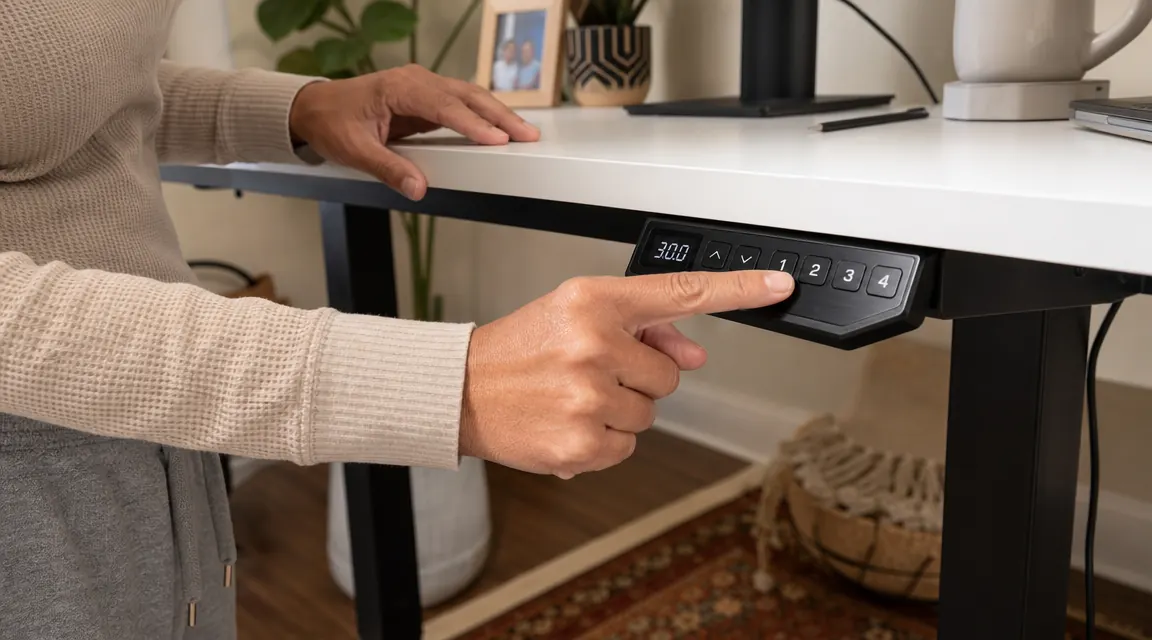
My sit height is 28.5 inches, saved as Preset 1. My stand height is 42 inches, saved as Preset 2. I have a third preset at 38 inches for when I am eating lunch at the desk. Getting those set took about five minutes on day one, and I have not had to touch them since. The panel holds the memory through power cycles, which matters because my power strip sometimes gets bumped.
For the first two weeks I was religious about alternating every thirty minutes. Then real life took over. Now I stand for the first hour of my charting session and sit for the last stretch when I am too tired to hold good posture anyway. The point is the desk makes the option easy. I press one button and it moves in about four seconds without me having to think about it.
Motor, Noise, and Transition Speed
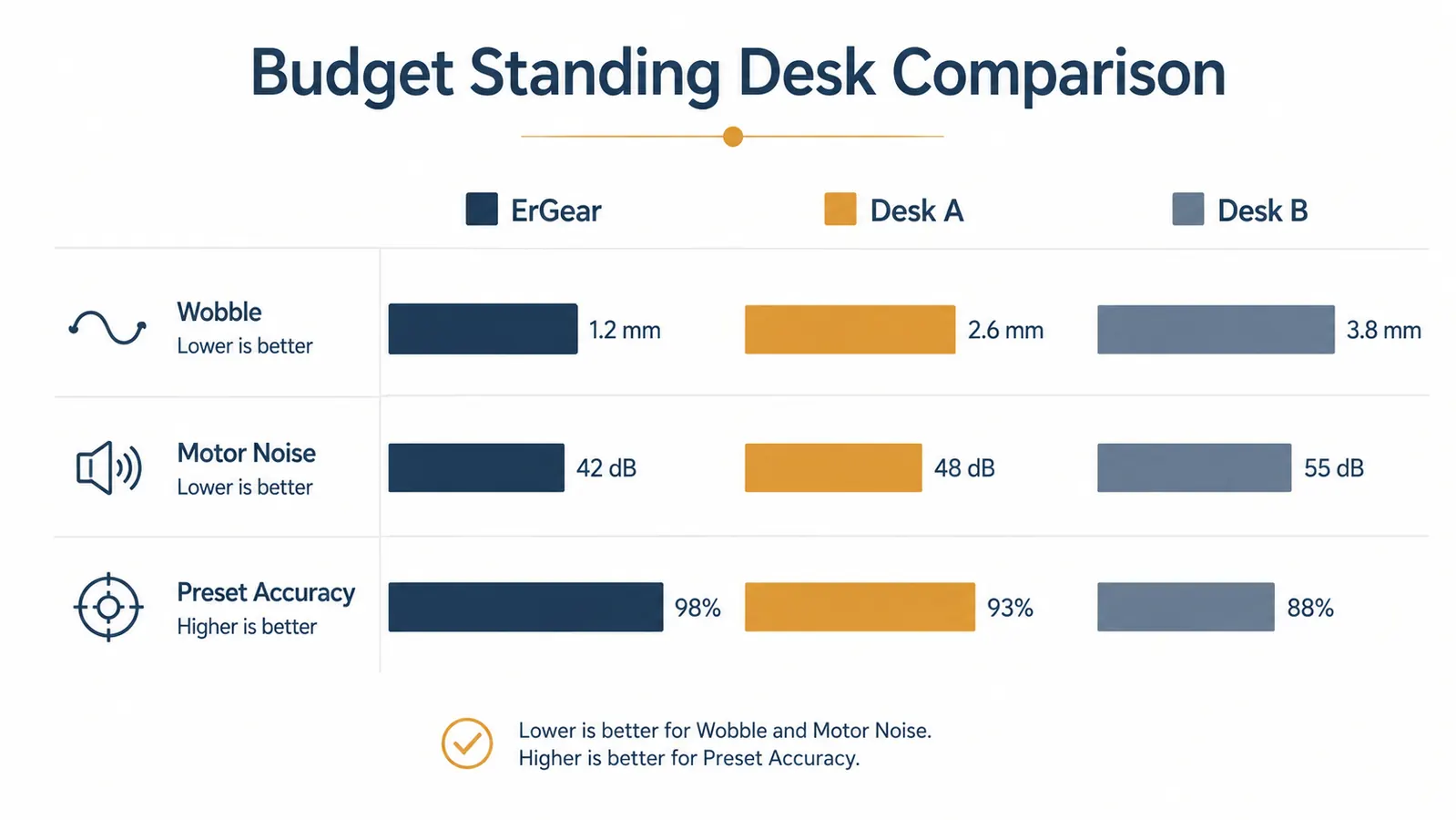
The motor on this desk is a dual-motor setup, and it shows. Transitions are smooth rather than jerky. I can feel a slight vibration through the desktop when it is moving, but nothing falls over and no cups have ever tipped. The noise level during movement is around the hum of a box fan on low, maybe slightly louder. My daughter sleeps in the next room and has never woken up because the desk was moving. That is the practical noise test I care about.
Speed is on the slower side compared to desks I have used at my hospital's office. The ErGear takes about four to five seconds to travel from 28.5 inches to 42 inches. At that pace it is not disruptive. I have used faster desks that sound like a small lawnmower, and I prefer this one's personality.
One thing to know: the desk has a built-in anti-collision sensor. If something is in its path during a downward movement, it stops and reverses. I triggered this once when my monitor cable got looped under the desk during a drop. The desk stopped, reversed, and I fixed the cable. No drama. That is the kind of failsafe that matters on a desk with a motor.
Wobble at Standing Height: The Honest Assessment
I am going to give you the part other reviews tend to gloss over. At 42 inches, which is my standing height, there is noticeable wobble when I type. Not dangerous, not alarming, but real. If I place two fingers on the desktop and push gently, the surface moves maybe a quarter inch in either direction before settling. With a monitor arm attached to the edge and a full-size monitor on it, I can see the screen shift very slightly when I am typing with any force.
Is this a deal-breaker? For me, no. I am typing on a laptop and a USB keyboard, not doing precision design work. The wobble is more of a sensory annoyance than a practical problem. But if you work with a large dual-monitor setup and any of those monitors are close to your face, you will notice it. The wobble diminishes significantly at sit height. Below 35 inches this desk feels rock solid.
I pressed Preset 2, the desk rose to 42 inches, and my lower back stopped hurting by week three. I cannot tell you exactly why it works, but I can tell you that my chiropractor visits went from twice a month to once.
Surface Quality and Desktop Dimensions
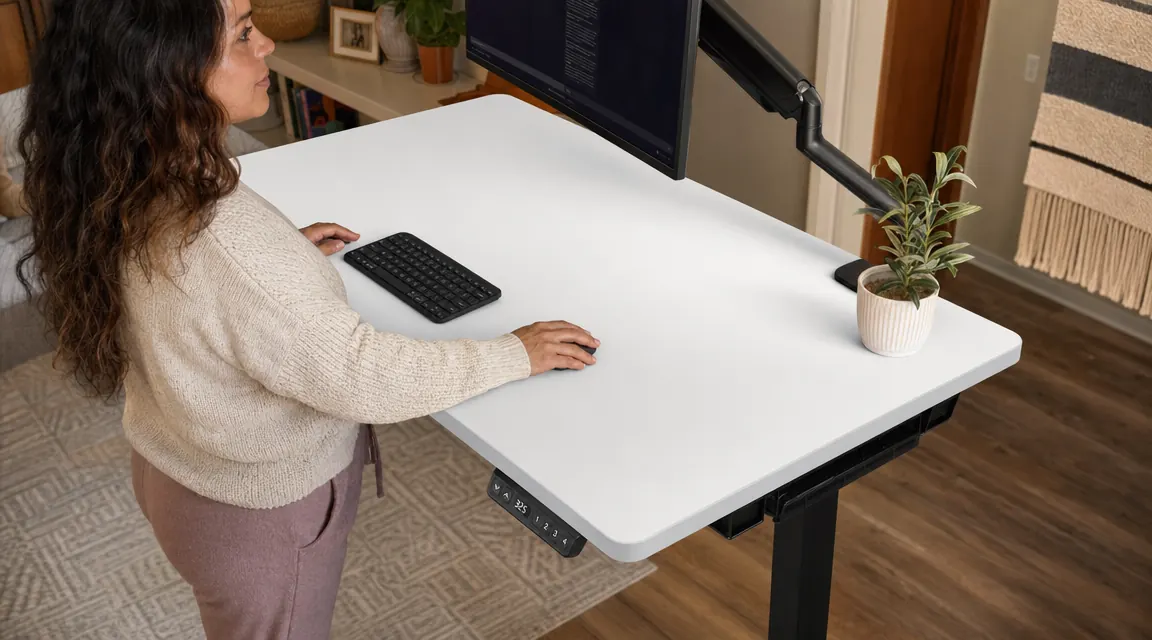
The 48-by-24-inch surface is the right call for a single monitor or laptop setup. I have a 24-inch monitor on a monitor arm, a laptop stand to the left, and a small plant on the far corner. Nothing feels cramped. The surface itself has a smooth, matte laminate finish. It is not a real wood grain texture but it photographs well and it wipes down easily, which matters when you are eating lunch at your desk.
After six months the surface has held up without any peeling at the edges. I did get one small scratch near the cable routing hole in the first week, which I put there myself by dragging a screw across it during assembly. That is on me, not the product. The color I chose is a light gray that matches my bedroom walls well enough that my husband stopped asking when I was going to move it to a real office.
The under-desk cable tray that ships with this model is the one part I replaced. It is a narrow mesh net that clips to the bottom frame, and while it works, it was not wide enough to hold my power strip, monitor cable, and motor cable without everything bunching up. I bought a wider cable management tray for about twelve dollars on Amazon and the problem was solved. It is a minor thing, but worth knowing before you set up.

Six Months of Back Pain Data
This is the part I actually care about. Before the ErGear, my lower back pain was a consistent seven out of ten by the end of my charting session. I had been using an old dining chair with a throw pillow jammed against the lower back for lumbar support. Glamorous, I know. Within the first three weeks of using the standing desk regularly, that evening pain dropped to a four. By month two it was sitting at a two or three, mostly hip flexor stiffness on the nights I forgot to stand.
I am careful not to credit the desk alone. I also started doing a ten-minute stretching routine before I sit down to chart, and I bought a decent anti-fatigue mat to stand on. All three things together made the difference. But the desk is the load-bearing piece of that setup. Without the option to stand, the stretching and the mat do not help much. If you want a framework for building this kind of routine, the guide on how to set up a standing desk routine that sticks walks through exactly how to structure it.
Alternatives I Considered
Before I ordered the ErGear, I spent about two weeks going back and forth on the FlexiSpot E7. The E7 has a stronger frame, a wider surface option, and better cross-brace stability at standing height. It also costs roughly double. I could not justify that spend without knowing whether I would actually use a standing desk consistently. Six months in, I probably would have been fine spending the extra money, but I do not regret starting with the ErGear. It was the right bet for someone who was not sure the habit would stick. If you want to see a full breakdown of these two desks side by side, the ErGear vs FlexiSpot comparison covers the specs in detail.
The other desk I seriously looked at was a manual hand-crank version that cost considerably less. I ruled it out because I knew I would not use it. Pressing one button is frictionless. Cranking a handle when you are already tired is not. The electric motor is not a luxury on this product. It is the reason the habit forms.
What I Liked
- Dual motor transitions are smooth and quiet enough for a shared-wall apartment
- Memory presets hold through power cycles and are genuinely easy to program
- Surface laminate has held up for six months without edge peeling or staining
- Anti-collision sensor stopped a potential monitor cable accident
- 48x24 surface is a real working area, not cramped
- Assembly is solo-doable in about forty minutes
Where It Falls Short
- Noticeable wobble at maximum standing height, especially with monitor arm at the edge
- Stock cable management tray is too narrow for a full desk cable load
- Surface scratch risk during assembly if you are not careful with hardware
- Slower transition speed than higher-end desks
- Height range tops out at 48 inches, which may not suit users over about 6 feet 3 inches
Who This Is For
The ErGear is built for people who want a real electric standing desk, not a riser or a hand-crank, and who are not ready to spend three hundred dollars on the FlexiSpot or four hundred on a Uplift to test whether the habit will stick. If you work from home in a spare room or a bedroom corner, run a single monitor or laptop setup, and want to get off the kitchen chair without a big commitment, this is the cleanest path I found. It also works well for students who need to study for long blocks. The options I have seen for people curious about the wider benefits are worth reading in the 10 ways a standing desk improves your focus and energy piece, which helped me understand what to actually expect from the habit before I bought anything.
Who Should Skip It
If you are running dual large monitors, especially on arms anchored to the back edge of the desktop, you will likely find the wobble at full standing height frustrating enough to wish you had spent more. If you are taller than about six feet three, the 48-inch max height may leave you hunching. And if you need a surface wider than 48 inches for a multi-monitor spread, you will want to look at a 60-inch version or a different brand entirely. This desk is not trying to be everything. It is a clean, honest starter desk at a price that makes sense for most home office budgets.
Six months in, I still press that preset button every evening. That is the only review that matters.
The ErGear standing desk is what ended my nightly chiropractor trips. If you are still charting or working from a chair that is wrecking your back, check the current price and see if it fits your budget.
Amazon Check Today's Price on Amazon →