
An ergonomic office chair like the GABRYLLY high-back is the single biggest fix for lower back pain at a home desk, but the chair alone is not enough. By 6 PM I was reaching for the heating pad before I even finished my charting. I had been working evenings at my kitchen table for almost a year, and the lower back pain had gone from occasional to constant. I told myself I would get used to it. I did not get used to it. If that sounds familiar, you are not dealing with a mystery condition. You are dealing with a setup problem, and setup problems have fixes.
Lower back pain from home-office work is one of the most common complaints remote workers report, and yet most people try to solve it with stretching routines and pain relievers instead of addressing the actual cause: spending six to nine hours a day in a chair that offers no lumbar support, at a height that is wrong for their body, in a posture that was never designed to be held for hours at a stretch. This guide walks you through five specific steps that address those root causes. Work through them in order and most people notice a real difference within one to two weeks.
If your chair has no lumbar support, every other fix is working against gravity
The GABRYLLY Ergonomic Chair is the specific chair I switched to after nine months of kitchen-chair back pain. It has a contoured lumbar pad, adjustable seat depth, 90-120 degree recline, and flip-up arms. Over 14,000 Amazon ratings with a 4.5-star average. If you want to see today's price before reading further, the link is below.
Amazon Check Today's Price on Amazon →Step 1: Audit Your Chair First, Everything Else Second
Before adjusting your desk height or buying a monitor stand, look at what you are actually sitting on. This is the step most people skip because chairs feel like a major purchase, so they convince themselves their current one is fine. It is probably not fine.
A chair that causes lower back pain has at least one of three problems: no lumbar support (your lower spine hangs in a flexed position all day), a seat pan that is too deep so the front edge cuts into the backs of your thighs, or a seat height that forces your knees above your hips. Any one of these, sustained over hours, overloads the lumbar discs and the muscles around them. All three together is how you end up reaching for the heating pad every evening.
The test: sit back fully in your chair right now. Does anything touch your lower back? If the answer is no, or if it only touches when you lean forward into it, that chair is not doing its job. A proper ergonomic chair has a contoured lumbar support that meets your back while you sit in a relaxed upright position. You should not have to work to feel supported.
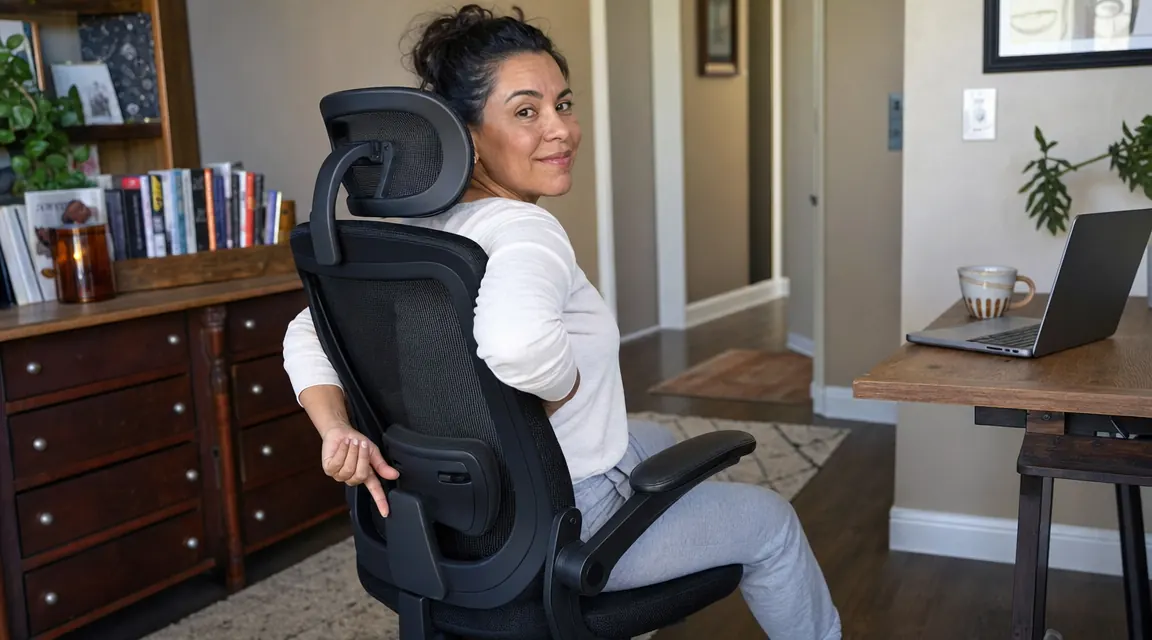
After going through this test myself and failing it on every chair I owned, I replaced my kitchen chair with the GABRYLLY Ergonomic Chair. It has a firm contoured lumbar pad that sits at the natural inward curve of the lower spine, not a flat mesh that just happens to be behind your back. The difference in end-of-day lower back pain was noticeable within the first week.
Step 2: Set Your Seat Height So Your Hips Are Level With or Slightly Above Your Knees
Seat height is the most overlooked setting on an adjustable chair, and it is the one that has the most direct impact on lower back pain. When your seat is too low, your hips drop below your knees, which tilts your pelvis backward and flattens the natural lumbar curve. Your lower spine goes from a gentle inward arc into a flexed C-shape, and holding that position for hours loads the posterior edges of the lumbar discs constantly.
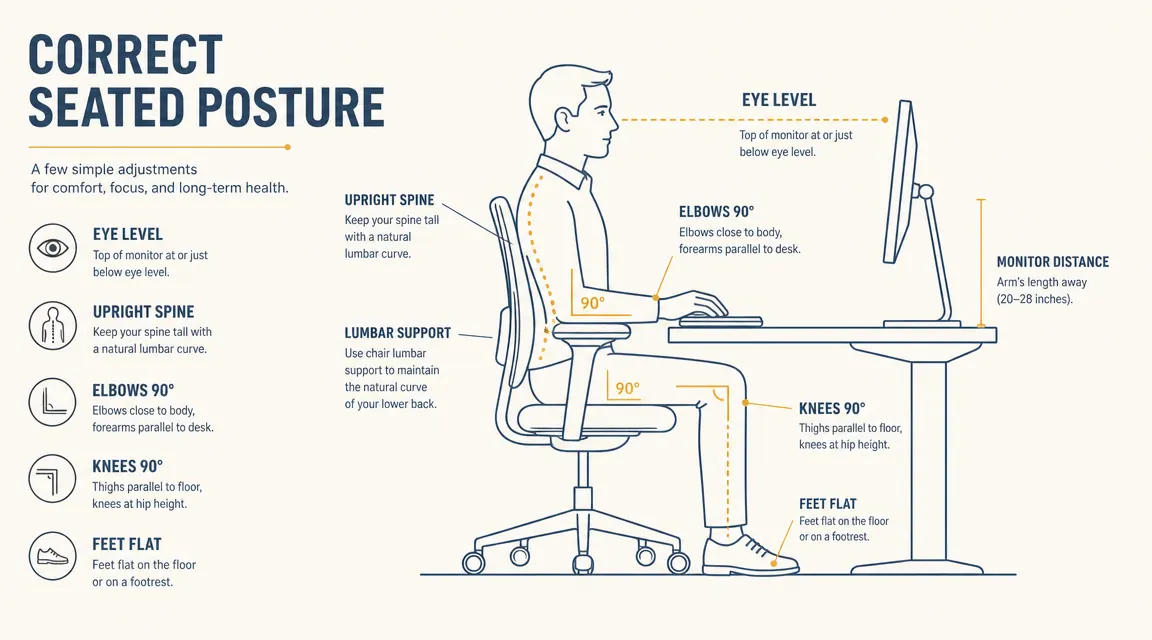
The correct position: adjust your seat height until your hips are level with or very slightly above your knees. Your feet should rest flat on the floor or on a footrest with no pressure behind the knee. At this height the pelvis can sit in a neutral tilt, which restores the natural lumbar curve and takes the chronic load off the discs and the erector muscles that have been compensating for years.
If you are using a chair without height adjustment, this single step may require a new chair. Most kitchen and dining chairs sit too low for desk work. If you already have an adjustable chair, raise it until you find that neutral pelvic position and notice whether your lower back discomfort shifts. Many people report meaningful relief from this change alone before touching anything else.
The issue is not that you sit too much. It is that your chair puts your spine in a position it was never designed to hold for nine hours straight.
Step 3: Position Your Monitor So the Top of the Screen Is at or Slightly Below Eye Level
This step sounds like it is about your neck, not your lower back, but the two are directly connected. When your monitor sits too low, you spend the day in a forward-head posture with your chin jutting toward the screen. That head-forward position creates a chain reaction down the spine: the thoracic spine rounds forward, which tilts the pelvis backward, which flattens the lumbar curve. Lower back pain that does not respond to chair adjustments alone is often a monitor-height problem in disguise.
The fix is straightforward: raise your monitor until the top of the screen is at or just below eye level when you are sitting with your back against the chair back and your head in a neutral position. For a laptop, this usually means a laptop stand or a separate external monitor. For a desktop setup, stack the monitor on a riser or switch to a monitor arm. The goal is to be able to look straight ahead and land on the top third of your screen without tilting your head down.
A monitor arm is the most flexible solution here because it lets you dial in the exact height and distance with no guesswork. If you are only doing one peripheral upgrade this month, a monitor arm has one of the highest impacts per dollar for whole-spine comfort.

Step 4: Build a 30-20 Movement Rhythm Into Your Workday
No chair eliminates lower back pain if you sit in it for six hours without moving. The lumbar discs get their nutrients through movement and compression, not through a fixed blood supply, so prolonged static sitting compresses them continuously without the pressure-release cycles they need to stay healthy. This is why even people with excellent chairs report stiffness after a long focused session.
The 30-20 rhythm is simple: after every 30 minutes of sitting, stand up and move for 20 seconds. You do not need a standing desk to do this. You need a phone timer and the habit of standing up. Walk to the kitchen, do a set of hip hinges in place, stand at a bookshelf to read something, or just stretch your arms overhead. The specific movement matters less than the fact that you are breaking the static compression pattern regularly.
If 30 minutes feels too frequent to start, begin with 45 minutes and work down. The research on sitting and disc health consistently points to the same conclusion: duration of static load matters more than posture quality over long stretches. A 30-minute rhythm with good posture beats a two-hour marathon in a perfect chair.
Practical way to enforce it: set a recurring 30-minute timer on your phone with the label 'stand up.' Put it face-up on your desk. After two weeks this becomes automatic and you will stop needing the alarm.

Step 5: Strengthen the Supporting Muscles With Three Daily Exercises
Setup fixes and movement habits solve the environmental cause of lower back pain. This step addresses the physical side: the deep stabilizing muscles around the lumbar spine, primarily the multifidus and the transverse abdominis, are often weak and inhibited in people with chronic lower back pain. Passive posture supports can only do so much when those muscles are not pulling their share of the load.
Three exercises address this without requiring a gym or special equipment. The first is the dead bug: lie on your back, raise arms straight up and knees to 90 degrees, then slowly lower opposite arm and leg toward the floor while keeping your lower back pressed flat. Ten reps per side, done slowly. This builds deep core stability without any compression on the lumbar spine.
The second is the glute bridge: lie on your back with knees bent and feet flat on the floor. Squeeze your glutes and lift your hips until your body forms a straight line from shoulders to knees. Hold for three seconds, lower slowly. Fifteen reps. Weak glutes force the lower back to compensate during every movement including sitting transitions, so this is more directly relevant to desk-work pain than any abdominal exercise.
The third is the bird dog: from hands and knees, extend one arm straight forward and the opposite leg straight back, hold for three seconds, return, switch sides. Ten reps per side. This teaches the spine to stay neutral under asymmetric load, which is exactly what it needs to do all day while you shift positions at your desk.
Ten minutes total, three times a week. Most people who do these three exercises consistently notice that their lower back feels more resilient within three to four weeks, not just less painful when seated but less reactive in general.
What Else Helps
Once the five steps above are in place, a few secondary adjustments compound the gains. Keyboard and mouse placement matters more than most people think: if your keyboard is too far forward, you end up leaning away from the lumbar support to type, which negates the chair entirely. Keep your elbows at roughly 90 degrees with your arms relaxed at your sides, and pull the keyboard close enough that you do not need to reach.
Room temperature plays a role that often gets ignored. Cold muscles fatigue faster and go into protective spasm more readily. If your home office runs cool, wearing a lightweight layer over your lower back during long sessions is not overcautious, it is practical. The same logic applies to a small lumbar roll if your chair is not adjustable: even a rolled-up small towel placed at the curve of your lower spine gives the lumbar vertebrae a surface to rest against instead of hanging in flexion.
For people who work long evening shifts at a home desk after a physical shift elsewhere, such as nurses charting after a clinical day, the chair upgrade matters even more. You are arriving at your desk already fatigued and with compressed discs from hours on your feet. A chair that adds static load to that state rather than offloading it will push you into pain much faster than it would someone who has been sedentary all day. The GABRYLLY chair's high back and contoured lumbar support are specifically useful in this context because the lumbar pad stays in contact with your spine even when you shift or recline slightly, rather than requiring you to sit rigidly upright to feel any benefit.
Your lower back has been working against your chair. Here is one that actually helps.
The GABRYLLY Ergonomic Chair has adjustable seat height, a contoured lumbar pad, flip-up arms, and a 90-120 degree recline lock. It is the chair I use for evening charting and it is the single change that made the biggest difference in my end-of-day back pain. More than 14,000 Amazon reviews and a 4.5-star average.
Amazon Check Today's Price on Amazon →