
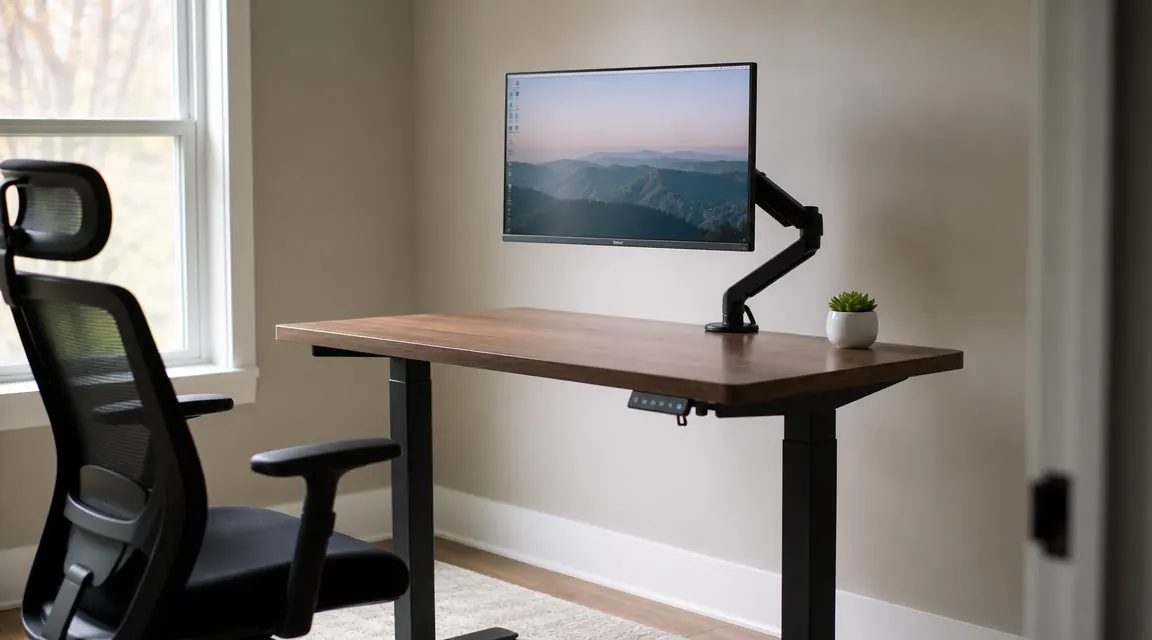
The ErGear electric standing desk has over 11,000 reviews on Amazon and a rating north of 4.5 stars. I understand why people buy it without much research. The price is low, the review count is high, and the product photos look clean. But I have used this desk through enough late evening charting shifts and weekend work sessions to tell you that the reviews, taken as a whole, paint a rosier picture than the real experience warrants for certain kinds of buyers. This is the breakdown of what those 11,000 reviews collectively skip over.
To be clear: I am not here to tell you this is a bad desk. For a specific buyer profile it is genuinely one of the better options under two hundred dollars. But the honest story requires talking about the wobble in concrete terms, the surface material's actual scratch threshold, a few assembly steps that the instruction booklet handles badly, and the motor noise in the one scenario where it actually matters. None of that makes it into most reviews. Let me fix that.
The Quick Verdict
A capable budget standing desk that works well for single-monitor laptop setups, but wobble at full standing height is real enough to be a genuine problem for dual-monitor users, and the surface scratches faster than the glossy reviews suggest.
Amazon Check Today's Price →Still charting from a chair that wrecks your back every night? That is the actual problem to fix.
The ErGear standing desk is the most cost-effective electric option I have found for a nurse or remote worker who wants to stand during evening sessions without spending furniture money. Check the current price before deciding.
Amazon Check Today's Price on Amazon →The Assembly Problem Nobody Warns You About
The instructions that come with the ErGear are a folded diagram sheet, mostly pictographic with minimal written steps. For most of the assembly that is fine. The leg frames bolt together predictably and the desktop connection is straightforward. The part that trips people up is the motor cable routing. The cables for the dual motors need to run up through the inside of the frame legs before the legs are fully tightened, and the diagram shows this in a small inset image that is easy to miss. If you tighten the leg bolts first and then try to thread the cables, you will be partially disassembling things. I watched two other buyers mention this in review threads after the fact.
The second assembly note: the desktop comes in two panels that lock together with a connecting bar underneath. When you flip the desktop over to attach the frame, the two panels can drift slightly if you have not fully tightened the connecting bar first. The result is a surface with a hairline gap down the center. It is purely cosmetic and the structural connection is fine, but if you want a seamless surface, snug the center bar before you flip it. Again, this is not covered clearly in the included guide.
Solo assembly is possible but the frame-to-desktop attachment step is genuinely easier with a second person. You are holding the frame upright while trying to align and drive four bolts into the underside of the desktop. I have done it alone twice, and both times I spent about ten extra minutes adjusting because the frame shifted during bolt driving. If you have someone available for that one step, use them.
The Wobble: More Specific Than Most Reviews Get
Nearly every review that mentions wobble does so in a single sentence and moves on. That is not enough detail to be useful. Here is what actually happens. At sitting height, roughly 28 to 32 inches, the desk is solid. You can lean on it, and nothing moves. At a mid-standing height around 38 to 40 inches there is minor wobble, maybe one-eighth of an inch of lateral movement under normal typing pressure. Most people find this acceptable. At or near the maximum standing height of 47 to 48 inches, the wobble increases to roughly a quarter inch of lateral movement under normal typing, and noticeably more if you type heavily or shift your weight against the desk edge.
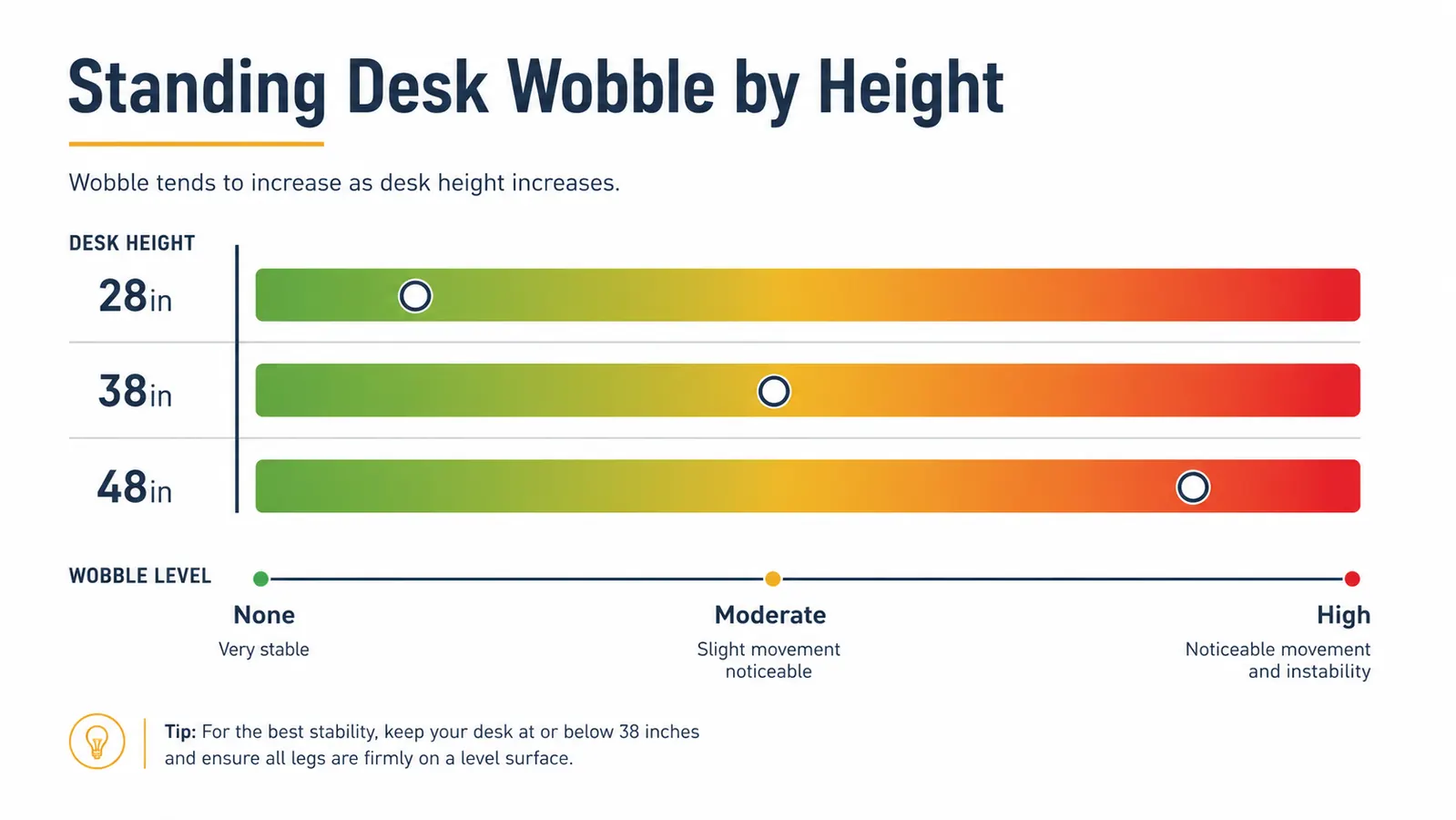
The wobble is a physics problem, not a defect. A longer leg span at full extension has more flex, and the ErGear's frame cross-bracing is adequate for the price point but not exceptional. The stability improves meaningfully if you keep both legs on a flat floor. On my bedroom floor, which has a slight slope toward the window, one leg is shimmed about four millimeters with the built-in foot pad. That shim reduces the instability noticeably. If your floor is uneven, account for this.
The practical implication: if you are using a single lightweight laptop or a single monitor on a desk-integrated stand, the wobble is noticeable but not workflow-breaking. If you have a 27-inch or larger monitor mounted on an arm that reaches toward the desk edge, you will see the screen move when you type hard. Dual monitors on arms, especially arms anchored at the back edge, amplify the wobble enough that I would direct you toward a heavier frame like the FlexiSpot E7 instead. A full comparison of these two sits in the ErGear vs FlexiSpot head-to-head piece if you want specs side by side.
Eleven thousand reviews can tell you whether a desk ships on time. They are less reliable at telling you whether a desk wobbles at 48 inches with a 27-inch monitor on it. That is the gap this review is trying to fill.
Surface Scratch Reality: The Laminate Is Not Bulletproof
The desktop surface is a medium-density fiberboard core with a smooth matte laminate coating. It photographs well, it wipes down easily, and it resists coffee rings with no staining as long as you get to spills within a few minutes. What it does not do well is resist sharp-edge contact. The laminate is thin enough that dragging a metal object across it, even lightly, leaves a mark. I got a shallow scratch near the cable cutout during my second assembly when a bolt slid across the surface.
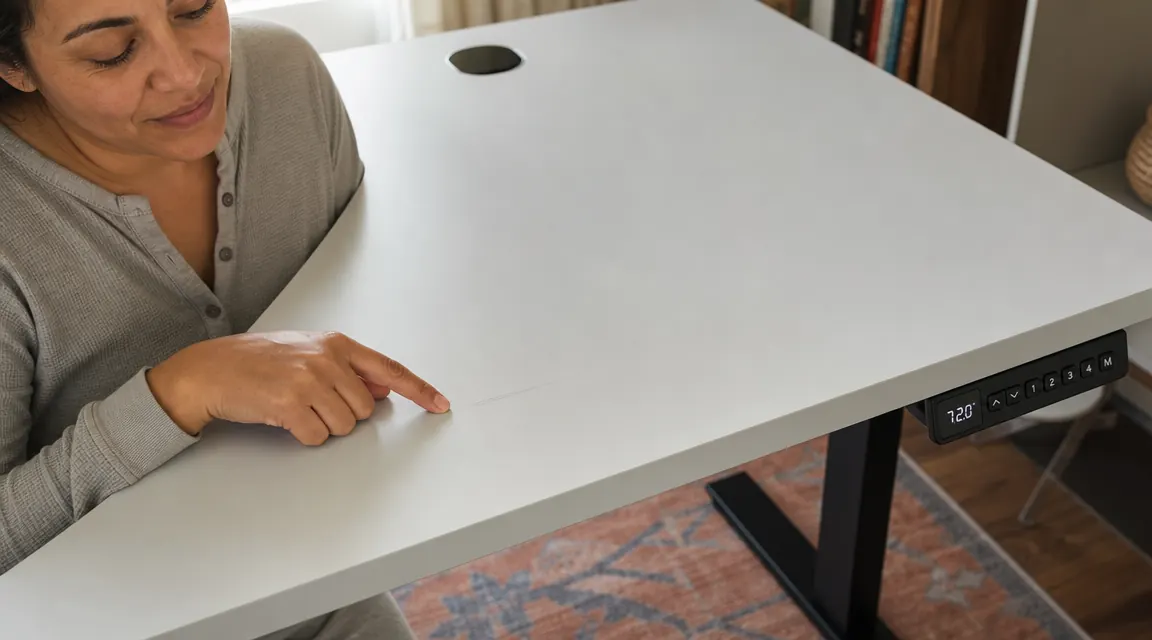
That scratch is not visible from normal working distance, and it does not affect function. But the underlying message is relevant: if you plan to use this desk as a shared surface where coworkers or family members will be putting down hard objects, bags with metal buckles, or ceramic mugs that get slid rather than lifted, expect surface marks over time. The darker color options, like the walnut finish, hide this better than the light gray. If surface longevity matters to you, go darker. And consider a desk pad for the main working area, which I added after month one and should have used from day one.
One thing the surface does hold up against: moisture from cups. I have set a cold water bottle directly on the surface hundreds of times over several months and there is no ring staining or swelling at the edges near the moisture. The laminate seal around the top face is good. The edges of the desktop, where the laminate wraps around the MDF core, are more vulnerable. On my unit the front edge laminate is still intact, but I have seen review photos from other buyers showing edge delamination starting around the three-month mark. Keep the edges dry.
Motor Noise: The One Scenario That Actually Matters
Most reviews describe the ErGear motor as quiet, and by standing desk standards that is roughly accurate. During a normal day, the transition noise is a low hum that lasts four or five seconds. You would not hear it from another room with the door closed. I have confirmed this from the next room while my daughter was asleep nearby. In a typical home office scenario the noise is a non-issue.
The scenario where it matters: video calls. If you are on a video call and you adjust your desk height mid-call, the mic will pick up the motor noise. I learned this in a telehealth documentation session when a colleague asked if I was running a vacuum. The motor hum is at a frequency that midrange microphones catch clearly. The fix is obvious: adjust the desk height before you start a call, not during one. But it is worth knowing that 'quiet' is relative, and a condenser or cardioid microphone will capture the sound even if your ears barely register it.
One additional motor note: there is a faint mechanical click at the very start and very end of each transition, when the motor engages and disengages. It is not loud, but it is audible in a quiet room at night. For evening charting sessions in a silent bedroom this is the only noise the desk makes that I notice. Again, not a problem in practice, just something nobody mentions and that surprises people the first time they hear it at 11 PM.
What the Memory Preset System Actually Delivers
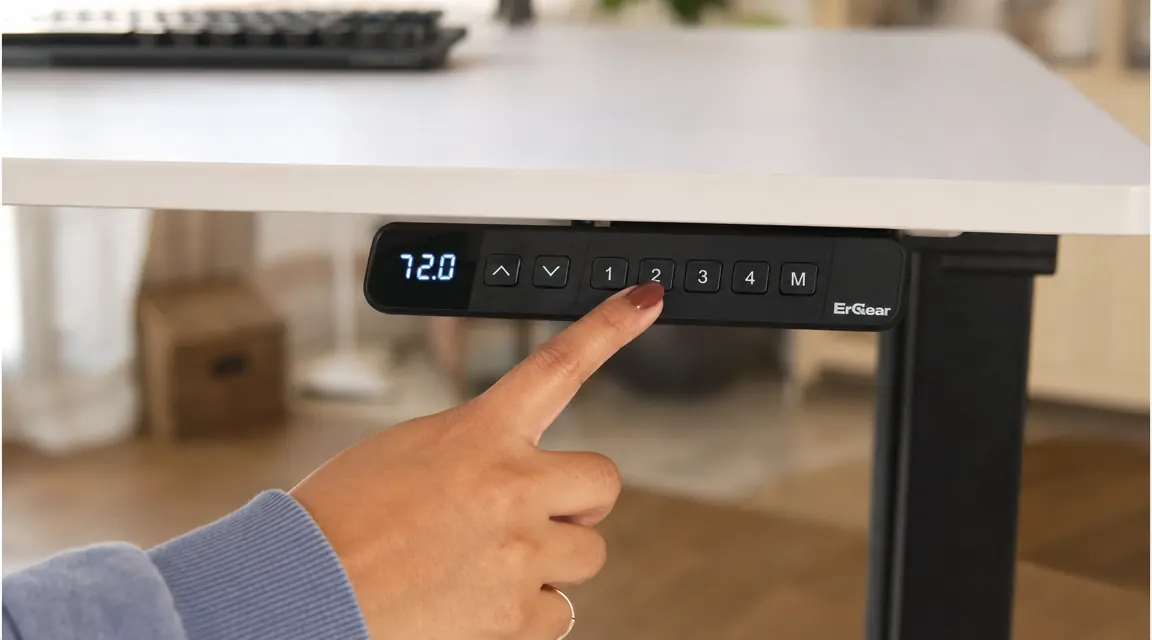
The four-preset memory panel is one of the genuinely good features on this desk. You hold a preset button for three seconds to save the current height, and press it once to return to that height at any time. The desk returns to saved heights accurately, within about two millimeters, which is close enough that you are not re-leveling your monitor every time you sit down. The presets survive power cycles. I have had mine plugged into a strip that gets switched off at the wall, and the presets were intact every time.
The one limitation: there is no lock mode that prevents accidental movement. The desk will respond to any button press, including the directional arrows that override preset positions. If young children have access to your workspace, one curious finger on the arrow button will start moving the desk. I have not had this be a practical issue, but parents of toddlers have flagged it in reviews. There is no child-lock equivalent on this control panel. It is a feature request that would cost ErGear almost nothing to add and would remove a legitimate concern for a segment of their buyers.
What I Liked
- Memory presets are accurate and survive power cycles reliably
- Dual motor transitions are smooth and quiet in typical use
- Anti-collision sensor catches cable snags on the way down
- 48x24 surface is genuinely functional for single-monitor setups
- Height range covers most adult users between 5 feet and 6 feet 3 inches
- Built-in foot pad adjustment handles minor floor unevenness
Where It Falls Short
- Wobble at maximum standing height is real and disqualifying for dual-monitor setups
- Laminate surface scratches faster than the photos suggest, especially near the cable cutout
- Assembly instructions miss the motor cable routing step in a way that trips up solo builders
- No child-lock on the control panel
- Motor click sound at transition start and stop is audible in quiet evening rooms
- Motor noise will register on video call microphones if you adjust mid-call
Who This Desk Is Actually For
The ErGear is the right desk if you are working from a laptop or a single monitor, you have a bedroom corner or spare room rather than a dedicated office, your budget ceiling is in the entry-level range, and you are not certain the standing habit will stick long enough to justify spending more. It is an excellent starter desk for nurses charting at home, students pulling long study sessions, and hybrid workers who want to stand a few hours a day without a furniture investment. The 10 ways a standing desk improves your focus and energy piece covers why that standing time pays off in productivity terms, if you want context for why the habit is worth building.
Who Should Skip It
Skip the ErGear if you plan to run dual monitors on arms, especially if those arms clamp to the back edge of the desktop. The wobble at full standing height will frustrate you within a week. Skip it if you are taller than about six feet three, where the 48-inch maximum standing height is below ergonomic ideal. Skip it if you want a wide surface, because 48 inches is narrow enough to feel limiting once you add a monitor arm and any desk accessories on both sides. And skip it if you want a surface material that will stay pristine for years in a high-traffic environment. The laminate is serviceable, not durable in the way solid wood or hardened steel surfaces are. For deeper context on building a sustainable routine around whichever desk you choose, the guide to setting up a standing desk habit walks through the scheduling and habit side in detail.

If you have read this far and the wobble and surface notes did not scare you off, this desk is probably right for you.
For single-monitor home office setups and evening charting sessions, the ErGear holds up. The preset system works, the motor is smooth, and the price makes the risk low. Check today's price and see if it fits where you are right now.
Amazon Check Today's Price on Amazon →